“Hybrid cloud” means having your cloud, and eating your on-premises cake, too. Put shortly, it’s splitting your workloads between cloud and on-premises environments, most often dictated by cost, availability, and the conclusions of the blog post your CTO read last night.
In this blog post, I will go into why I decided to host my Mastodon instance that way, and what the outcome looks like in my situation.
Motivation
I decided to move (at least part of) my GCP GKE Autopilot-hosted Mastodon setup
when I tried upgrading my deployment and wound up with 3 Redis pods where I expected just 1. While the
setup was already quite optimized FinOps-wise (arm64 Scale-Out, Spot node pool, etc.),
the sheer allocation minimums for this compute class foretold a rather costly bill.
The Redis deployment was created by a Helm chart, in turn used by my very hacked up version of Jeremiah Lee’s Terraform module (which I should note has worked very well for me!), and I had a choice: either waste a couple of hours figuring out how to thread through the Redis replica count I want (since it was already set to 1 everywhere my eye could see), or spend a similar amount of hours on moving to a self-hosted setup and slash the compute costs completely, all for the low price of a Raspberry Pi 5.
If you know the components of a Mastodon instance, you may have raised your eyebrow at the mention of just the Raspberry Pi 5 alone. There is a persistent data storage component involved - a PostgreSQL instance. Running it on an SD card is heavily discouraged for card wear reasons, so an external drive is a must. The modern drive interface to pick here is an M.2 through a HAT - the shopping list grows. Once you have that all set up, you’re still on the hook for all the usual DBA duties - backups, database upgrades, and so on.
This led to my “hybrid cloud” decision: the GCP Cloud SQL instance I was running was a fraction of the Kubernetes costs, and it took away most of the real operational complexity of the setup. Everything else was relatively stateless, and the cluster in particular could be, at this scale, replaced with a Docker Compose file and offer similar, if not better, maintainability and velocity.
And why was this setup so over-engineered in the first place, you may ask? Firstly, it was fun to build. Secondly, I wanted to see if a single-user Mastodon instance on cloud provider Kubernetes was feasible. If you’re wondering the same thing, let me save you the trouble: it really isn’t, both cost- and maintenance-wise.
Migration
Prep
- Prepare an Armbian server image for the Raspberry Pi 5. I used
armbian/buildwith some customizations to prepare an image tailored for server use (with Docker, systemd networking, and some security hardening built in). - Set up a Demilitarized Zone (DMZ) on my home router. DMZ is a separate network segment that cannot reach the rest of the network. If the Mastodon instance gets popped, it cannot access my router or my IoT and personal devices.
- Provision a public IP address for the Cloud SQL instance and authorize access from my static home IP.
- Modify Mastodon’s
docker-compose.yml(remove database), and a.env.productionfile (Docker hostnames, credentials, details of the cloud database instance).
Out of all of these, the network setup was easily the most challenging part - networking is not my forte, but I wound up with a solid setup just taking it step by step, and testing things as I went.
Cutover
- Stop the Kubernetes deployments.
- Run database migrations (since I upgraded the version while at it) by adding this snippet to
docker-compose.yml:
services:
  # ...
  migrate:
    image: ghcr.io/mastodon/mastodon:v4.6.3
    restart: "no"
    env_file: .env.production
    command: bundle exec rails db:migrate
    networks:
      - external_network
      - internal_network
    depends_on:
      - redis
    volumes:
      - mastodon_public:/mastodon/public/system
  # ...
- Start up the Raspberry Pi containers.
- Repoint the DNS from the old to the new instance.
- Get to shitposting. No database migration war stories though, cause there wasn’t one.
Outcome
For an SRE, the afterparties are usually more interesting than the main event.
Latency
I’ve been monitoring the instance using Google Cloud Monitoring uptime checks pointed at Mastodon’s health check endpoint. The latency uptick is highly visible, but expected for a move off the same infrastructure that’s hosting the uptime checks:
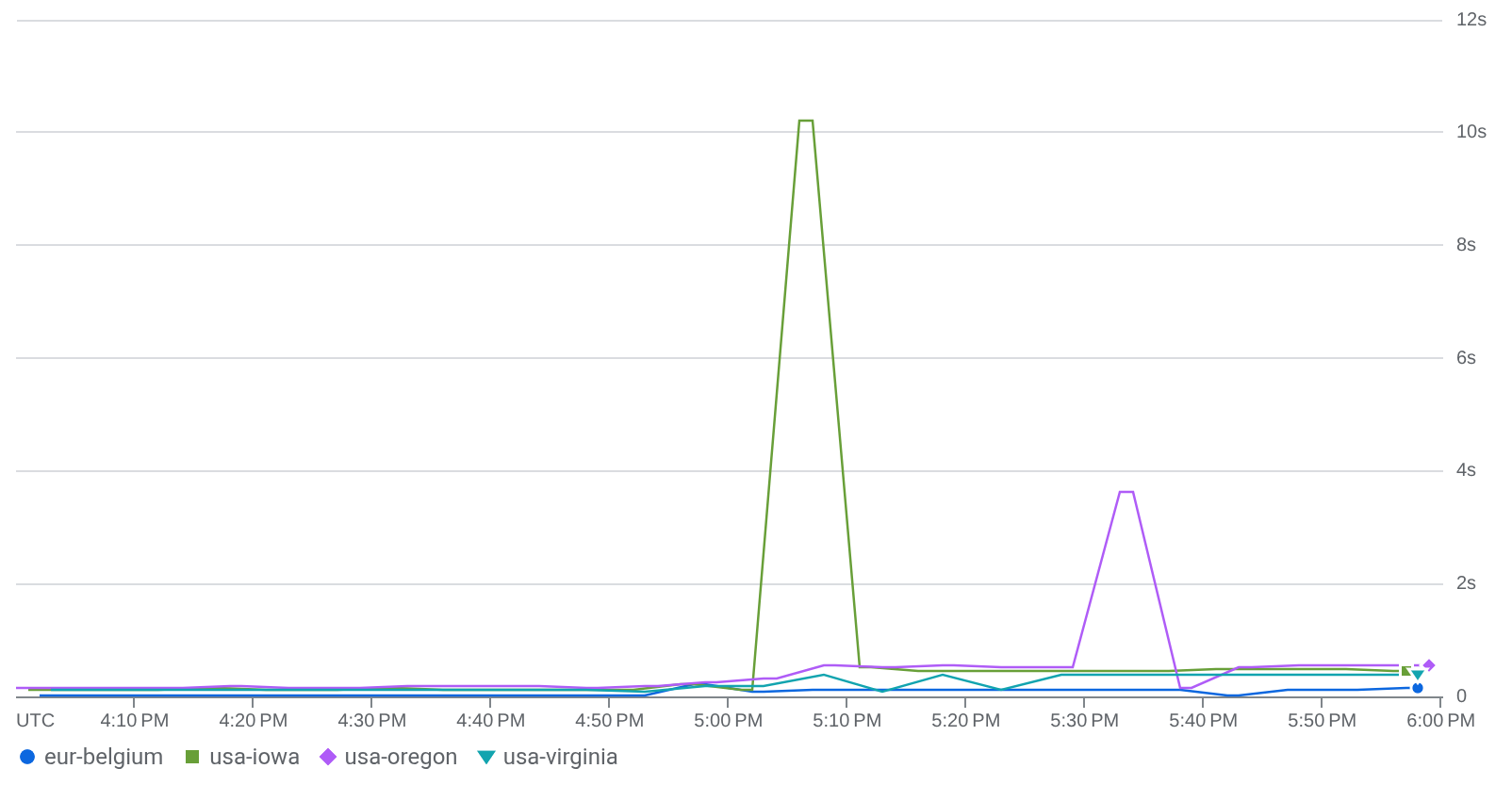
Primarily, we’re looking at eur-belgium (historically lowest) latencies
rising from ~0.02 s to ~0.11 s, and usa-oregon (historically highest), rising
from ~0.17 s to ~0.55 s. Now, that’s a lot, but it’s also the price one has to pay
for not taking the information highway, but building your own little information village.
Infrastructure as Code
My Terraform setup for this has been much simplified. After some state surgery, I wound up with a single Terraform project hosting all the base infrastructure and its monitoring, compared to the previous setup spanning 2 projects and 2 modules.
This is, of course, at the price of limited normalization of the new setup - at the moment, it’s a bash script I wrote during the migration. But, do I truly need more here?
Metrics
One underappreciated thing about using a cloud provider (and its monitoring stack) is the sheer amount of metrics you get about your stack with close to no intervention. I lost this “free” monitoring for the Mastodon compute and load balancer as I migrated them from GKE to the homelab.
Now, the obvious solution in the new setup would be to self-host the monitoring solution locally as well, but this homelab runs on SD cards, hopes and dreams, and neither of these are too conducive to frequent reads and writes.
And so, leaning into the hybrid approach, I decided to integrate my local setup with Google Cloud Monitoring (GCM) instead.
I installed node_exporter on the Mastodon host, let a machine on the main LAN (outside DMZ) scrape its metrics, and shuffle them to GCP’s OTLP endpoint over
at https://telemetry.googleapis.com. This way any GCP authentication data stayed outside the DMZ, on a trusted host
that’s not available from the internet.
That gave me a basic idea of what’s going on. The plan going forward is to deploy Mastodon-specific monitoring, and extend monitoring to other parts of my homelab, for example my network devices.
Billing
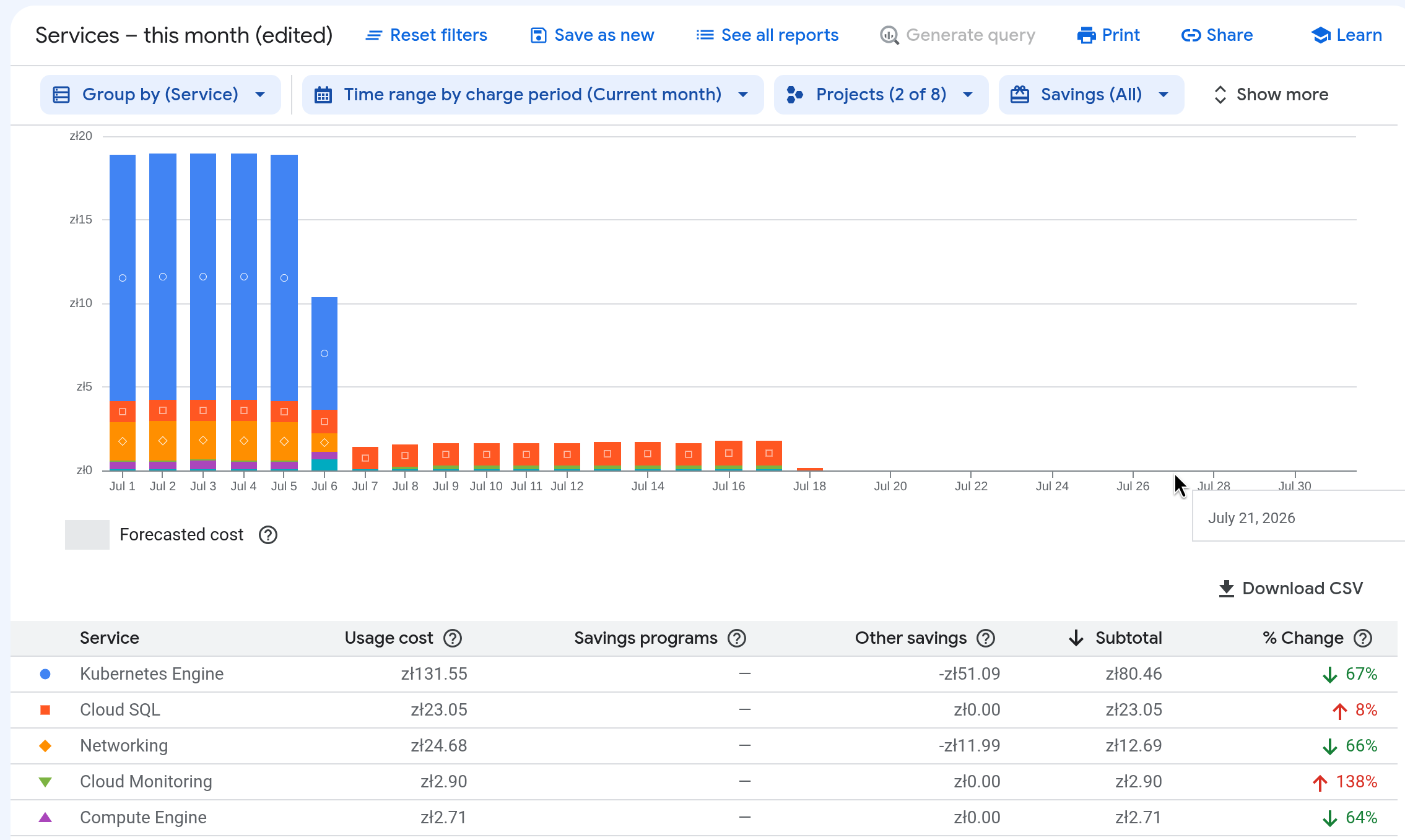
The migration lowered the GCP bill drastically.
Running a single database and a monitoring setup of this size costs me 0.40 € a day, compared to 2.30 € a day I had to pay for a full-sized setup, and the 4.06 € a day I had to pay after my Redis replica count snafu (thankfully, only for a short while - turns out watching money fly out the window is a really good motivation).
Conclusion
While I’m still ironing out the kinks in my instance, this entire endeavor didn’t take more than half a day (while worrying about it took a solid part of the one before). Since I didn’t have to move any data around (with the database staying in the cloud), it wasn’t too stressful either, and there were many options to bail out along the way.
Obviously, the latency numbers could (and will) use some improvement, but I am very satisfied with billing, as well as monitoring outcomes. The former, for obvious reasons. The latter, because it allowed me to establish the groundwork for monitoring my homelab with GCM.